
Executive summary
Service businesses often begin with a simple mix of phone calls, email, spreadsheets and message threads. That can work while the team is small, but it becomes fragile when the same job needs an enquiry record, a booking, an assigned worker, a customer update, a commercial status and a later report. A work order tracker solves that by treating each job as an operating record that moves through the business.
This guide is for owners, operations managers and technical buyers who are considering a custom workflow platform for trades, maintenance, retrofit, installation, callout or field-service teams. It explains the public-safe architecture behind a service-business work order system: the layers, responsibilities and rollout decisions that matter before any integration is added.
Why service businesses outgrow disconnected tools
Disconnected tools create friction because each one holds only part of the truth. A spreadsheet may show who is due on site. An inbox may hold the original customer request. A message thread may contain the latest update from a worker. An accounting tool may show whether a draft invoice exists. None of those views, on their own, answers the operational question: what needs to happen next?
The problem usually appears as repeated data entry, duplicated customer updates, unclear ownership, missed follow-ups and office teams asking field teams for information that has already been shared somewhere else. The more services, vans, subcontractors, booking forms and invoice steps a business adds, the more valuable a single workflow record becomes.
The operating-record principle
The core design principle is straightforward: every meaningful piece of work should have one shared operating record. That record does not need to replace every specialist tool. It should connect the key states that teams already care about: enquiry, qualification, booking, assignment, site progress, customer communication, evidence, commercial status and reporting.
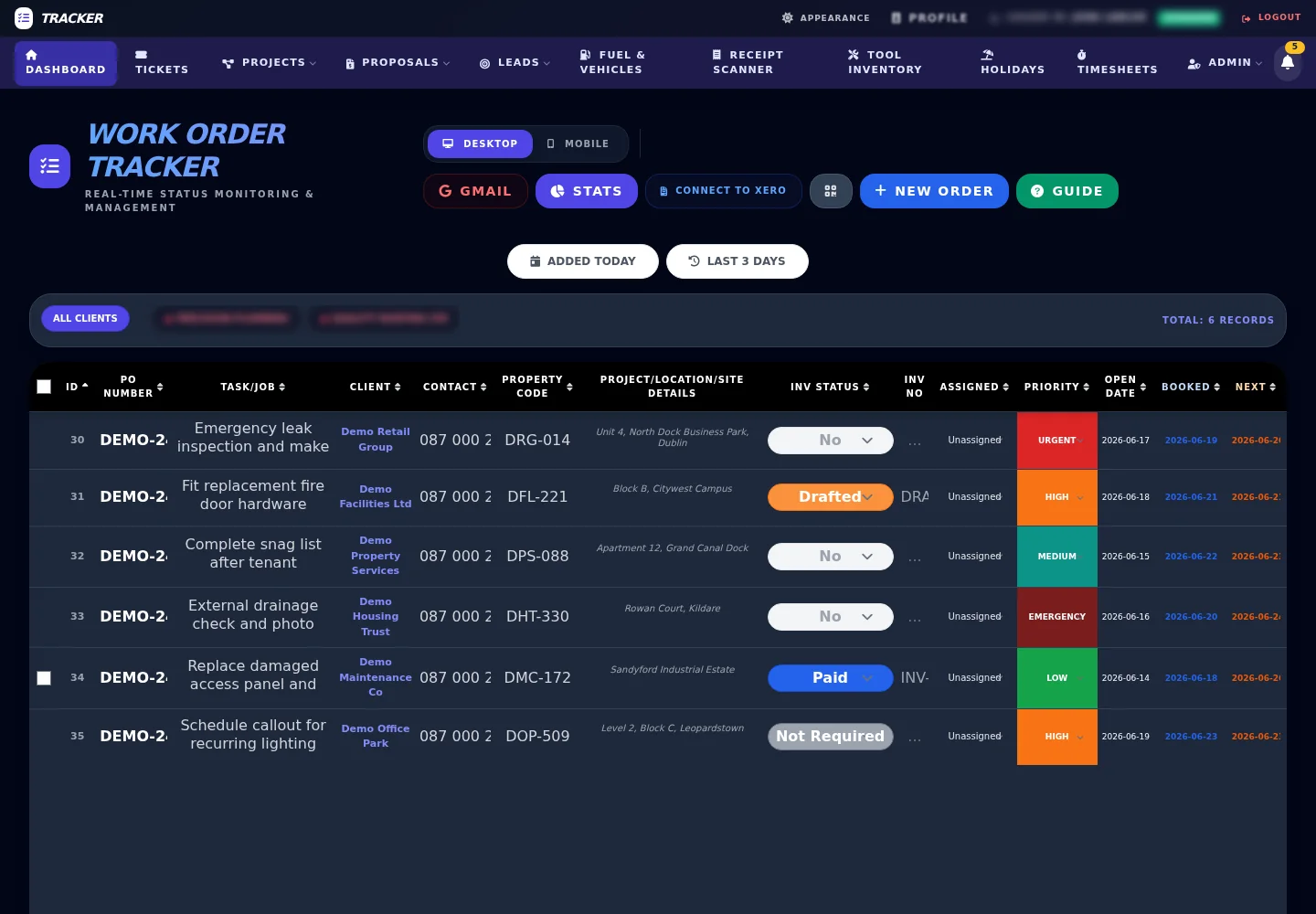
When the operating record is reliable, the dashboard becomes more than a table. It becomes the place where office staff, managers and field teams can see the current status, understand responsibility and decide the next action. The architecture should therefore protect clarity: each status should mean something, each handoff should be visible, and optional modules should support the workflow rather than clutter it.
Intake and booking layer
The intake layer turns loose enquiries into structured work. A useful system accepts requests from forms, calls, email, repeat customers and booking flows, then normalises them into fields that can be reviewed. The first goal is not automation for its own sake. The first goal is to capture enough context for qualification, assignment and follow-up without forcing customers through a heavy process.
For many service teams, the booking layer should collect contact details, location, service type, preferred timing and notes about the job. It can then support initial assignment, callout planning or office review. A well-designed intake flow also makes later reporting easier, because the source, category and first action are recorded from the start.
Operations dashboard
The operations dashboard is the working surface for the office. It should show current jobs, ownership, priorities, status, dates and exceptions. Filters are important because different roles need different views: today's jobs, unassigned jobs, waiting customer replies, invoice-ready work, problem cases or a specific team's workload.
Good dashboard architecture separates the daily workflow from secondary detail. The default view should make urgent work obvious. Deeper panels can hold notes, history, commercial information, attachments or scheduling context. This avoids turning the main screen into a dumping ground while still keeping the full record available when a manager needs it.
Field workflow
Field workflow needs to be fast, mobile-friendly and tolerant of real working conditions. A worker should be able to see assigned jobs, understand the task, add notes, update status and attach relevant evidence at a safe conceptual level, such as photos or documents, without navigating a full office dashboard on a phone.
Status transitions matter here. A job might move from assigned to on the way, started, waiting, completed, issue found or ready for office review. The exact labels vary by business, but the architecture should make each transition useful to both field and office teams. A handover back to the office should carry enough context for customer follow-up, invoice preparation or next-step scheduling.
Customer communication and handoff
Customers do not need to see every internal state. They need clear updates at the moments that matter: booking confirmation, appointment changes, requests for more information, completion handoff, approval steps or payment preparation. The work order record should therefore support communication history and controlled customer-facing updates without exposing unnecessary internal detail.
When messages are linked back to the operating record, the team can reduce repeated questions. The office can see what was sent, the field team can see what is expected, and the customer receives clearer next steps. This is especially useful where several people touch the same job over multiple days.
Reporting and administration
Reporting should be built on consistent operational states. If statuses and categories are reliable, managers can see workload, bottlenecks, overdue follow-ups, invoice preparation queues and team capacity. If the workflow is inconsistent, reports become decoration rather than decision support.
Administration modules can be added where they support the core record. Vehicle checks, tool inventory, leave, support tickets, documents and team notes may be useful for some service businesses, but they should not all be treated as mandatory on day one. The best architecture leaves room for these modules while keeping the central workflow understandable.
Integration layer
The integration layer connects the tracker to surrounding systems. Typical patterns include accounting and contact synchronisation, email intake, public booking forms, customer messaging and AI-assisted extraction from structured or semi-structured documents. The public lesson is not the low-level wiring. The lesson is that integrations work best after the central record is stable.
An accounting integration, for example, is easier to trust when job categories, customer details and commercial status are already consistent. AI-assisted extraction is more useful when the extracted data has a clear destination in the workflow. Customer messaging is safer when the system knows which job, status and contact the message belongs to.
Phased implementation
A work order platform should normally be rolled out in phases. Start with the central workflow: intake, job record, status, assignment and basic reporting. Add integrations after the team trusts the core data. Add deeper reporting after statuses are being used consistently. Add team-specific modules only when they remove real friction.
This sequence reduces risk because each phase proves one layer before the next one depends on it. It also makes adoption easier. Staff are not asked to learn a full platform at once; they learn the part that improves their current day, then the system expands around that working habit.
Operational benefits
The practical benefits are clarity and momentum. A shared operating record gives the office clearer status, reduces duplicated updates, supports faster invoice preparation, improves scheduling visibility and makes customer handoff more reliable. Those benefits come from removing ambiguity rather than adding screens.
No architecture can remove the need for good process. The platform has to reflect how the business actually works. But when the record, dashboard, field flow and integrations are designed together, the system becomes a stronger base for daily operations and future automation.
Related LaraWeb systems and services
This resource sits alongside the Work Order Tracker product overview, which explains the packaged operations platform direction. For businesses planning a similar system, the most relevant services are CRM and admin automation, custom web applications and online booking systems.
For implementation evidence, see the Energy Retrofit Jobs Manager case study and the Dispatch Board module. They show how service-business workflows can be broken into practical, reusable layers without turning every explanation into a full system disclosure.
Safe-public-information disclosure
This guide is a generalized architecture explainer based on real workflow-system experience. It intentionally excludes non-public client configuration, internal operations, source locations and security implementation details. The aim is to explain the design approach clearly enough to be useful without exposing information that should remain restricted.